Annotations
Annotations consist of labels and dimension lines.
Labels
Labels are used to show some information about the object they are attached to. A label can be a text label or a 2D symbol.
-
Text label – The label's text can be built from data in the database, using data requests. The label can show, for example, the position ID, pipeline information, and coordinates. The text size is the same as the active text size in the "Text" menu.
-
2D symbol – The parameters can be taken from the database.
There are three types of labels:
-
Component labels – This label type can be attached to any kind of component (equipment, standard component, pipe, etc.), and it can have any kind of data request for that component.
-
Connection point labels – This label type can be attached to any kind of connection point, and it can have any kind of data request for the component or pipeline that owns the connection point.
-
Free point labels – This label type can be attached to any point, but it cannot reference the database.
It is possible to define rules that specify what kind of components can be hit when including labels in a given System. You can specify if there are one or two points by which the label will be set in the view and how these points will be set.
Example
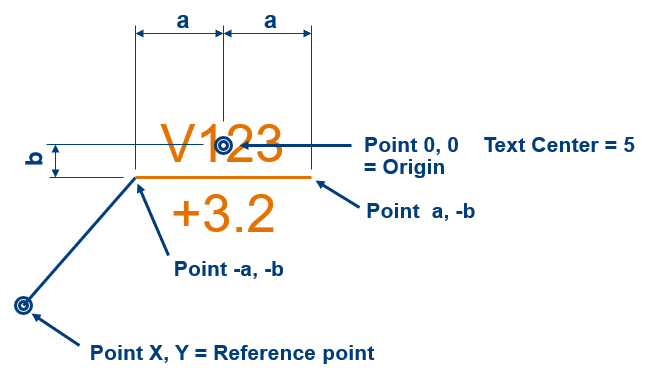
This example shows a text label that displays a horizontal line with Valve Position Id above the line and Z-level below the line.
Component labels
When inserting a component label:
-
If the label is a text label, select Setting from the menu to obtain the text attributes. If the label can be edited, then the text is also displayed, using default values from the database.
-
If the label is a symbol, enter the values for the attributes. The possible parameters of the symbol can also be edited.
-
If the label requires an origin or reference point and it has not been defined to be the same as the hit point, you are prompted to define it.
Connection point labels
When inserting a connection point label:
-
If the label is a symbol, specify the attributes. The symbol parameters may also be displayed for editing.
Free point labels
When inserting a free-point label, you are prompted to set the "free" point.
-
If the label is a text label, specify the text attributes. If the text can be edited, it is displayed using text from the data request as default text.
-
If the label is a symbol, specify the 2D symbol settings: Scales, Rotation, Color, Pen, and Layer. Symbol labels may also be editable in the dialog.
-
If the label requires an origin or reference point to be different than the free point, you are prompted to define it.
Dimensioning
The default properties of the dimensions are defined in Annotation Property Defaults. When you use associative annotations, the dimensions are updated when you start to annotate the view. Annotations are associative when the dimensions are connected to points or components in the 3D model.